TL;DR: There's no single best CRM for senior living. The right one depends on your lead volume, how well it connects to your phone and marketing systems, and whether your team will actually use it consistently. NextWave generally sees Welcome Home fit single communities and small portfolios best, HubSpot fit larger or multi-community operators running complex marketing, and Go High Level fit smaller operators just getting started.
How to Choose the Best CRM for Senior Living Communities
We sat down recently with our team to talk through a question that comes up in almost every conversation we have with operators: which CRM should we use?
The honest answer is that there isn't one right tool for every community.
There's a right tool for your lead volume, your team's comfort with software, and how much of your business already runs on other platforms. After years of setting these systems up, migrating operators off broken ones, and watching what actually gets used once the sales team is left alone with it, our team at NextWave keeps seeing the same few patterns.
What Should You Look for in a Senior Living CRM?
Most CRM comparisons start with a features checklist. Reporting, dashboards, automation, and a mobile app, but that list will tell you almost nothing about whether the tool will actually work for your team.
Does It Connect to Everything Your Team Already Uses?
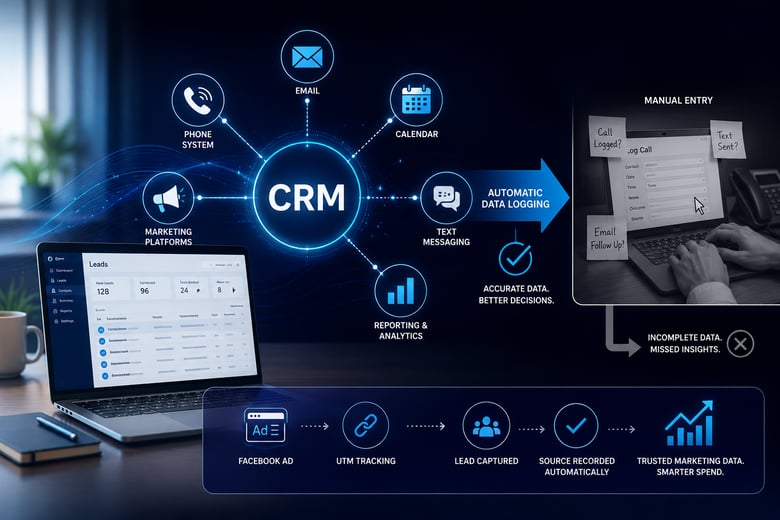
What matters more is whether the CRM connects to everything else you already use. Your email, your phone system, your calendar, your marketing. When it does, information gets logged automatically instead of depending on a salesperson to remember to type it in. When it doesn't, you end up with a system that becomes too difficult to use because you must change too much human behavior.
We've watched operators buy a CRM that looked great in the demo, only to find out later it didn't talk to their phone system. Now every call has to be logged by hand, with multiple clicks and screens.
Does It Track Where Your Senior Living Leads Actually Come From?
Although attribution is a difficult and imperfect science, a CRM that automatically records where a lead came from, based on UTM parameters or other mechanisms, gives you marketing data that can help you make better decisions about your spend.
You can also have prospects self-select how it is they found out about your community, which is helpful, but often the sources may contradict each other, so it’s best to have both.
Why Most "Best CRM for Senior Living" Lists Get It Wrong
Vendors sell CRMs on how much they can do. More features, more automation, more customization, but in practice, that's often the opposite of what a senior living sales team needs.
If you give a salesperson too many options and workflows they can build themselves, the CRM starts becoming too complex, or too distracting. Most communities just need a place to log a call, a text, an email, a tour, without extra clicks in between.
What Breaks When Your Senior Living Sales Team Starts Using It
A CRM can be genuinely easy to use and still sit unused, which is the uncomfortable truth of most failed rollouts. The hard part is getting a person to consistently hit the button that’s in front of them, because again, you’re needing to change a human’s daily behavior.
We've seen this play out even in tools built specifically to make things simple. Take for example a senior living CRM that has an internal dialer that lets a salesperson place a call with a single click, right from the browser. Plenty of salespeople still reach for their personal phone instead, because that's the habit, and because the CRM's number can look unfamiliar or spammy on caller ID, and they don’t want to use it.
Another part that breaks if you’re not careful is the standardization of documentation across the organization. A CRM can show a tour was logged and still tell you nothing useful, if the note just says "had a tour" instead of marking it in a way that shows up in a report.
An empty contact record doesn't always mean nothing happened. Sometimes it means something happened and nobody wrote it down. Someone has to actually look, not just assume the system is capturing everything on its own.
This is also where consistency across a team matters more than any single feature. One salesperson might be logging everything properly while another is doing a fraction of the work, and from the outside, both records can look fine until someone digs in.
Best CRMs for Senior Living Communities
HubSpot: The All-in-One CRM for Long Sales Cycles
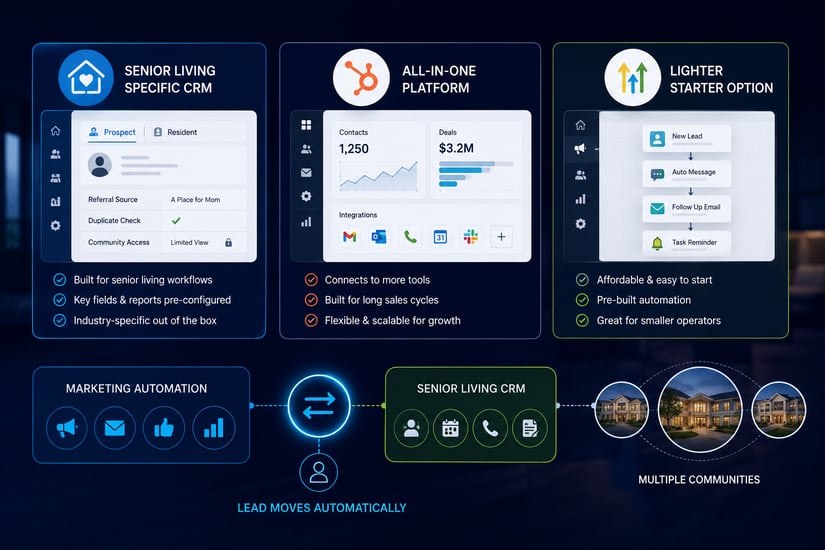
A platform like HubSpot wasn't built for senior living specifically, but it's built to handle a long sales cycle, which is exactly what this industry has. It connects to more outside tools, it doubles as a marketing platform, and it's flexible enough to run something as complex as a centralized, remote contact center working leads for dozens of communities at once. The tradeoff is that none of that comes configured for senior living out of the box, so usually, senior living companies need someone with specialized expertise to help set it up.
Welcome Home: The Senior-Living-Specific CRM
A senior living specific CRM, like Welcome Home, comes built for the industry out of the box. Prospect and resident are already separate fields instead of something you build yourself. Referral source reporting, duplicate detection from third-party sites, and the ability to limit what a community-level salesperson can see are already there instead of something you configure by hand. Much of the benefit of using a senior living CRM shows up in the fields and reports you never have to build yourself.
Go High Level: The Budget-Friendly Starter CRM
For a smaller operator with a handful of communities, a lighter and cheaper tool like Go High Level can be a reasonable place to start, mainly because it's inexpensive and comes with pre-built automation you can turn on quickly. The tradeoff shows up later, once the operator outgrows what a starter tool can handle.
You Don't Have to Choose Just One
None of this has to be an either-or decision. Marketing automation can run in one platform while a salesperson works the lead in a simpler, senior living specific tool, as long as the two are connected. The lead should move from one system to the other without anyone lifting a finger.
The 4 Things Worth Tracking in Any Senior Living CRM
Whatever CRM a community ends up with, four data points matter the most based on what we’ve found:
- Where the lead actually came from.
- Whether anyone actually reached them.
- Where they are right now in the process, whether that's pre-tour, post-tour, or moved in.
- And if the lead was lost or disqualified, the actual reason why.
A community that tracks those four things consistently is using its CRM well, regardless of which platform it's running on. A community that isn't tracking them has a database, not a working sales tool, no matter what the software cost.
What to Protect When Switching Senior Living CRMs
Before spending more on lead generation, or on a new CRM, it's worth knowing what happened to every lead you already paid for. A migration built on top of an already broken follow-up system just moves the same problem into a new interface.
Losing a connection to a referral site like A Place for Mom or Caring.com means a salesperson is back to manually creating a contact from a raw email, which is exactly the kind of friction that creates more work for people that they won’t do.
Staff comfort is worth weighing too, even if it shouldn't be the deciding factor on its own. Moving a team off a tool they've used for years takes a lot of effort, and if people prefer a current process, they may just keep doing it, even if the new tool is better.
If you're not confident which platform fits your lead volume, your team, and everything you already run, it's worth getting an outside read from an expert. We recommend always starting with the minimum you actually need and growing into something larger as necessary.
The Best Senior Living CRM Is the One Your Team Actually Uses
There isn't a single best CRM for senior living. There's the CRM that fits how your team already works, connects to the tools you're not willing to give up, and gets used consistently enough that the data inside it is something you can trust.
Key takeaways
↳ Most "best CRM" comparisons focus on feature lists. What actually determines whether a CRM works is integration with your phone, email, and marketing, plus honest source tracking.
↳ A CRM being easy to use doesn't guarantee it gets used. Habit, caller ID familiarity, and inconsistent documentation can leave even a well-built tool half-empty.
↳ Welcome Home, HubSpot, and Go High Level each fit a different operator: senior-living-specific out of the box, built for long sales cycles at scale, or an affordable starting point for smaller portfolios.
↳ Four data points matter more than any dashboard: lead source, whether contact was made, pipeline stage, and the real reason a lead was lost.
↳ Switching CRMs risks losing integrations and staff familiarity. Know what happened to your existing leads before you sign a new contract.
Next steps
Pull a list of every lead in your CRM from the last 90 days and check how many have a real, specific source, a documented last contact, and a current pipeline stage. If most records are missing one of those three, the gap probably isn't the software. It's the system around it.
NextWave offers a free audit of your CRM setup and follow up process. You'll walk away knowing what's actually being tracked, what's falling through the cracks, and whether the fix is a new platform or a better system for using the one you already have.

.webp)
.png)